


Works in Your Environment
A best in class tool integrated with an extensive set of embedded development toolchains
Start Trial
Cantata Integrations: Streamlined Cross-Platform Testing and Deployment
Cantata is a powerful testing tool that offers seamless integration with Windows® and Linux® host operating systems. Whether you prefer a Built-on-Eclipse® IDE or an Eclipse-Ready® plug-in set, Cantata caters to your needs. It supports GNU GCC & gpp and Microsoft Developer Studio® compilers, and comes with an array of embedded development toolchains.
- IDEs and Cross-Compliers
- Real Time Operating Systems
- Debugger
- Build / Continuous Integration
- Software Configuration Management
- Requirements Management
To confirm how your specific tools and platforms are supported, please contact QA Systems.
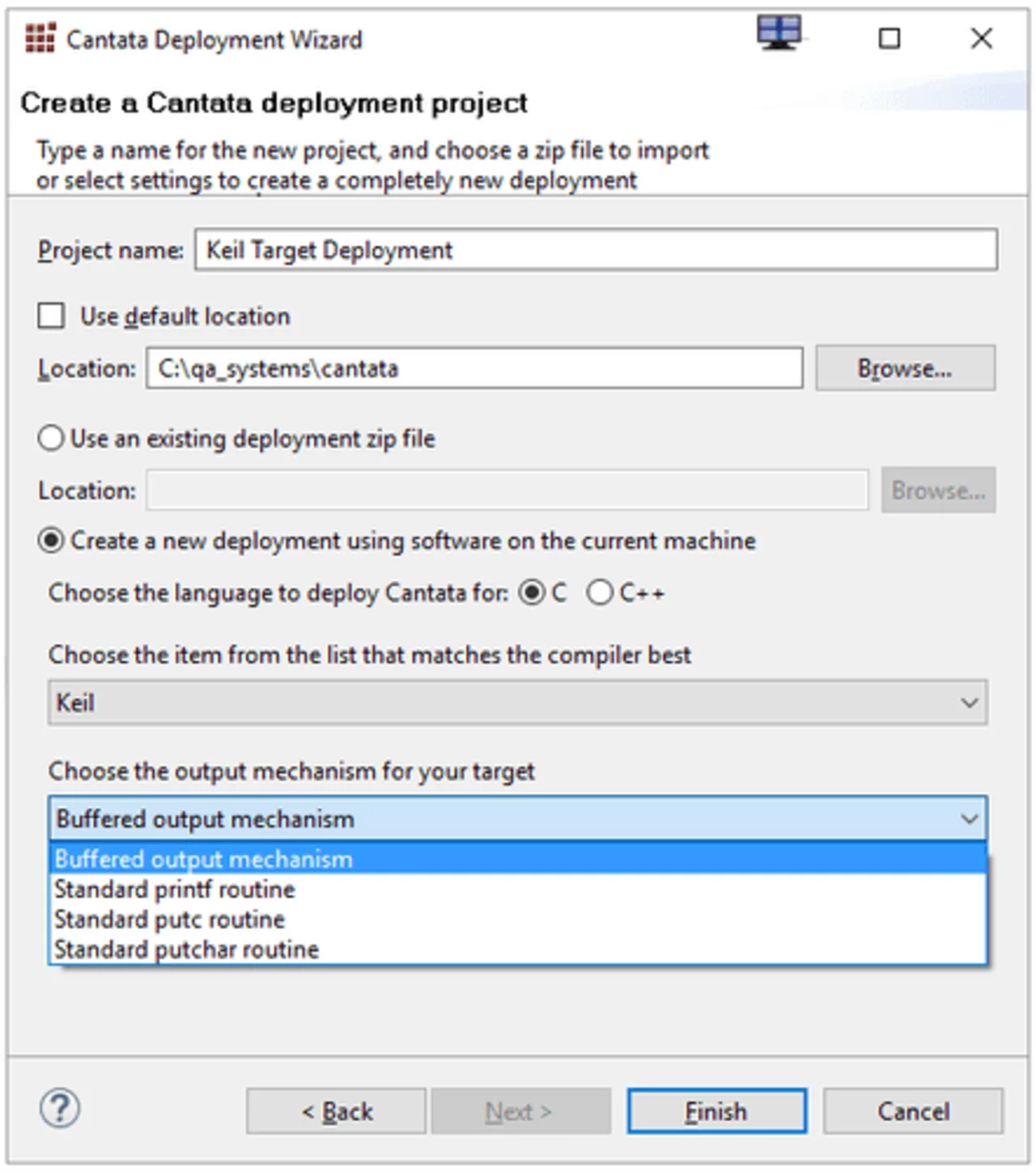
Seamless Deployment to Your Target Platform
Deploying Cantata to your specific target platform is hassle-free, with a built-in deployment wizard and a powerful editor that offers unlimited deployment without any license restrictions. The wizard simplifies the process of selecting basic settings, while the dedicated multi-mode editor provides step-by-step assistance to fine-tune settings.
Cantata deployments consist of libraries and configuration options tailored for each specific target, ensuring binary compatibility with your code. Engineers can easily use Cantata for their tests on that platform once it’s deployed.
You have the flexibility to deploy Cantata to a target yourself, or you can opt for the professional service available. To get a free assessment for Cantata compatibility in your target environment, please contact us or get in touch with your local supplier.
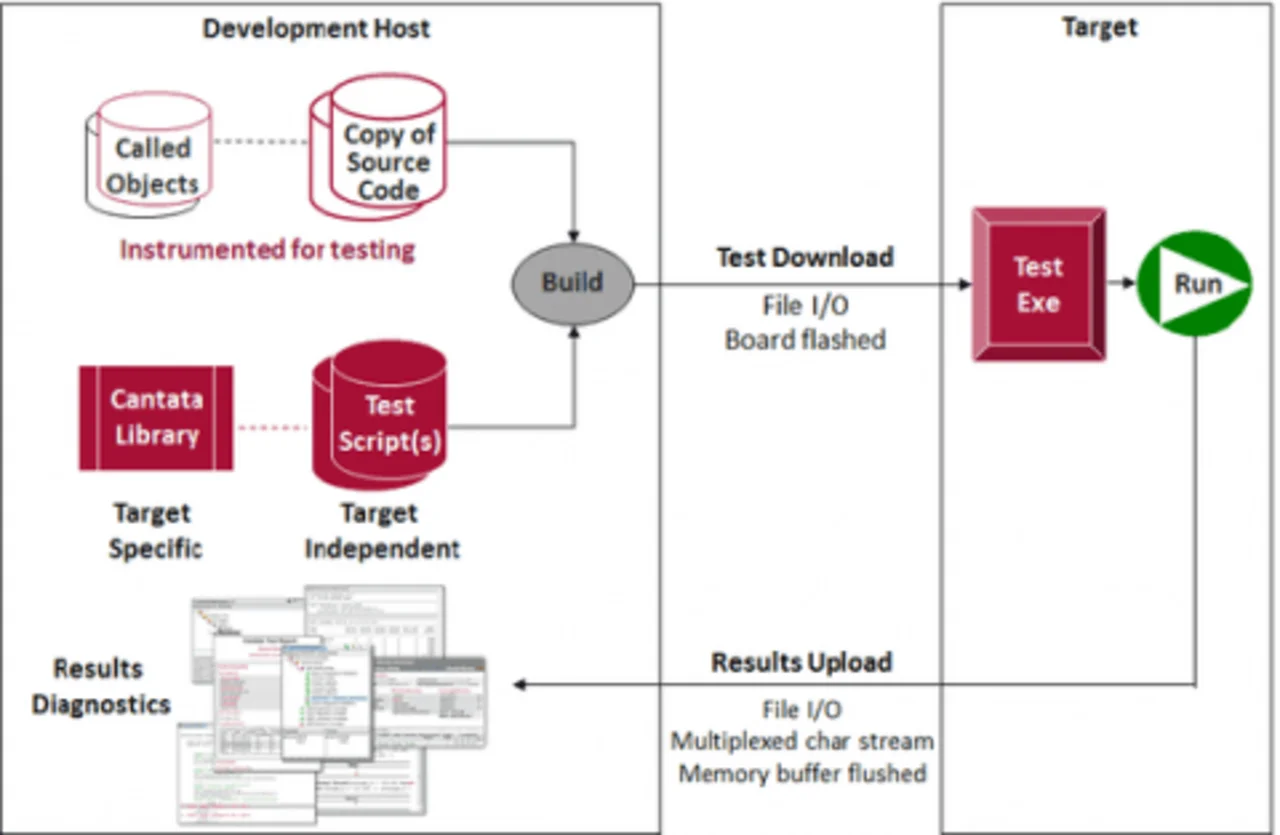
Effortless and Flexible On-Target Testing
Cantata tests are platform-independent scripts written in C/C++, and with target-specific deployments, they become C/C++ executables. You can download and run these tests on a variety of platforms, including simulators, emulators, and physical target boards, just as you would with your own code.
- Simulator
- Emulator
- Physical Target Board
Cantata easily adapts to any target communication mechanism, making test execution and results retrieval fully automated using Cantata Makefiles, test scripts, and platform deployments. Enjoy easy and flexible on-target testing through the intuitive GUI or CLI.
Discover a seamless testing and deployment experience with Cantata, designed to meet your specific needs and platforms.
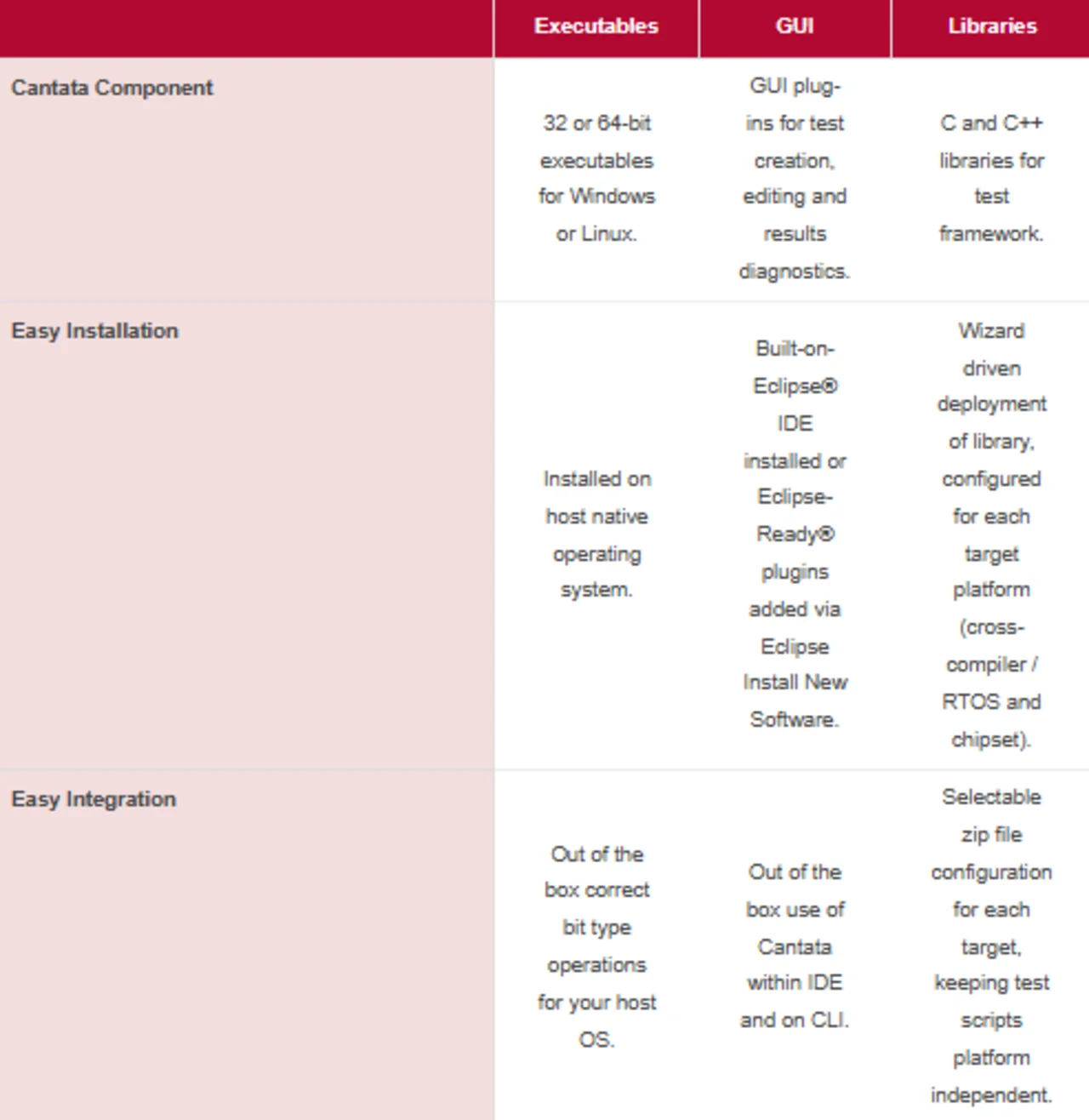
Easy Tool Integration
Building embedded software for multiple target platforms requires an efficient development toolchain. With Cantata, you can seamlessly integrate this powerful tool suite into your existing setup, simplifying the process of setting up testing on your targets.
Installing Cantata is a breeze, as it can be easily obtained from the cloud and deployed to your workstation using standard InstallAnywhere® and Eclipse capabilities.
The included Cantata deployment wizard eliminates any licensing restrictions and enables unlimited deployment to embedded targets. It generates a deployment zip file that stores the Cantata library and configuration settings specific to each target.
Teams can conveniently share multiple target configurations and test scripts. To meet tool certification requirements, Cantata allows verification of target deployments by running a target platform specific test suite as part of the deployment. A deployment registration checksum ensures control of test executions with the relevant target configuration.
Cantata empowers you to build unit or integration tests as executables, which can be run under debuggers for precise diagnostics.
All Cantata inputs and outputs can be easily stored in SCM systems, and the built-in Cantata Makefiles can seamlessly integrate with your preferred build and continuous integration tools.
Furthermore, Cantata offers seamless integration with popular requirements management tools, enabling smooth data interchange using CSV, Excel, or ReqIF™ formats. Explore the Cantata Requirements Traceability capability for more information.
Cantata Supported Integrations
Cantata has been integrated with an extensive set of embedded toolchains which is constantly being updated.
If an element of your specific environment is not listed, please contact QA Systems to check for the latest information.
IDEs / Cross Compilers
Analog Devices VisualDSP++®
Arm® Development Studio
Cosmic Software
Cygwin™ / GNU
NXP® CodeWarrior®
Green Hills® MULTI®
IAR Embedded Workbench®
Intel®
Arm® Keil® µVision®
Lynx Software Technologies™ Luminosity®
Microsoft® Visual Studio®
QNX® Momentics®
Renesas® CS+
Renesas® e2 Studio
Renesas® High-performance Embedded Workshop
TASKING® VX
Texas Instruments™ Code Composer Studio™
Wind River® (Tornado®, Diab™, Workbench)
Debuggers
GDB
JTAG®
Lauterbach™ TRACE32®
Real Time Operating Systems
Bare board (no RTOS)
Azure® ThreadX®
(formerly ThreadX Express Logic®)
FreeRTOS™
Green Hills® INTEGRITY®
IntervalZero RTX®
Lynx Software Technologies™ LynxOS®
(formerly Mentor Graphics Nucleus®)
Micriµm® µC/OS-II™
MontaVista®
Continental Automotive® OSEK®
AUTOSAR®
Sysgo® PikeOS®
QNX® Neutrino®
Embedded Brains® RTEMS®
Segger® embOS®
Green Hills® µ-velOSity™
Windows®
Wind River® Linux®
Wind River® Rocket
Wind River® VxWorks®
Build / Continuous Integration
CMake®
GNU® Make
Jenkins®
Maven™
Microsoft® Azure®
Software Configuration Management
IBM® Rational® ClearCase®
CVS
Git™
Atlassian® Jira®
Perforce® HelixALM®
Apache® Subversion®
Requirements Management
Dassault Systems Reqtify®
IBM® Rational® DOORS®
Microsoft® Excel®
Siemens® Polarion™ ALM software
PTC® Windchill®
(formerly PTC® Integrity™)
PTC® Codebeamer™
(formerly Intland codeBeamer®)
Integration Demos